

 Refresh
User DashBoard and White Label Admin
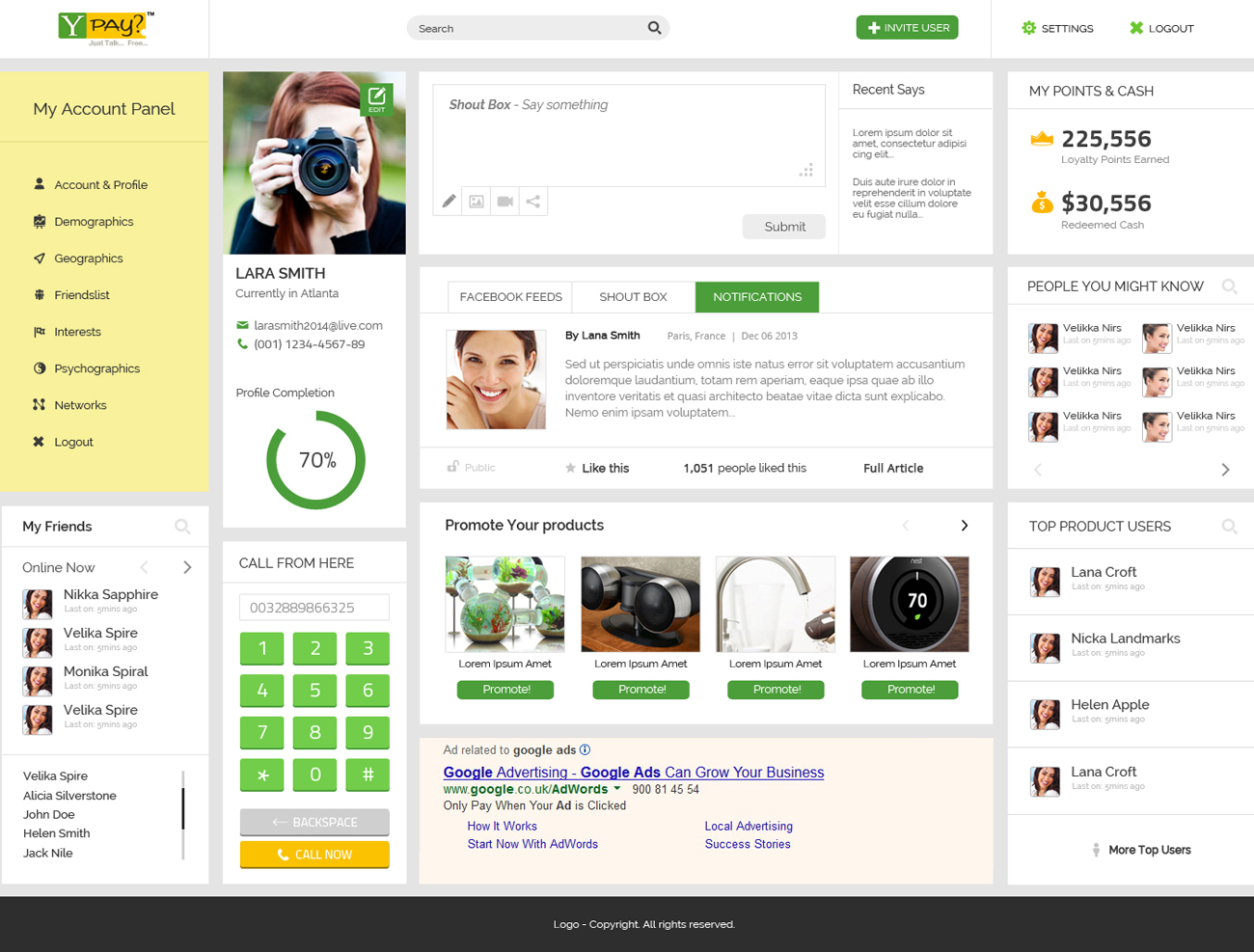
Want to win a job like this?
This customer received 5 web designs from 2 designers. They chose this web design from Unity Design Studios as the winning design.
Join for free Find Design Jobs
-
 US$300
-
 5 designs
-
 2 designers
Web Design Brief
The Project Contains two aspects I) User screens and II) White Label Admin Screens
I) User Screens:
---------------------------------------------------------------------------------------------------------
Criteria :
Should be a unique layout with Crisper Images, fonts , Look & Feel should be eye catching, pleasing and most user friendly with great user experience."having the ability to display the following sections.
Target Audience: 18 - 40 years , most of the users would be with in the age group of 18-30.
1) Registration Page
2) Log in Page
3) Dash Board
4) Profile Management and settings
5) Reports
6) Shout Box -- Similar to that of Linked In feed or Face Book Feed.
7) Viral Marketing - Ability to invite friends to join the site
Detailed Steps involved for each module
1) Registration Page :
-The ability to register by using his Email/Phone No or faceBook
- A validation screen for entered Email and Phone no
- Screen to answer a set of questions which form the basic input criteria and will be part of the profile management once the User Logs in
- Link to terms and conditions and other relevant items which fall as part of registration
2) Log In page :
- The ability to enter the Email/PhoneNO and password with Login specific details associated
3 )User Dash Board :
Mandatory Sections in the Dash Board :
a) Profile of the User
This should display the Photo , Email Id, Phone No and profile completion status
b) Ability to display Loyalty Points earned ( This should be the BOLD and Highlighted)
c) Ability to Display the Redeemed Cash based on the loyalty points earned ( This should be the BOLD and Highlighted)
d) Ability to Show the Show the Friends list which is fetched from Facebook
e) Ability to show friends who have been invited and who have joined the site
f) Ability to show the top users of the product could be friends who have joined through referral/ any other medium or Facebook
g) Link to Shout Box
h) Should be able to navigate to Profile Page if user wishes to edit the profile
i) Ability to answer the proforma which includes Demographics, Geographics, Interests etc
j)Ability to Display Google Ads
k) Ability to Promote offers of the Product
l) The user should be able to see "people he might know "
4) Profile Management and settings :
a) Ability to Edit his/her details
b) Ability to Go through the Set of questions which are part of proforma. The more the questions are answered the more the profile status bar will be updated.
c) Ability to display settings - similar to that of Face Book Settings
5) Reports:
a) Usage Details
b) Invited Friends Details
c) Etc
6) Shout Box :
a) Ability to Say what is going on in the users mind
b) Ability to see what the other users have posted
7) Viral marketing
a) Ability to invite friends by invoking social networking platforms/ emails etc.
II) Admin Screens
---------------------------------------------------------------------------------------------------------
Criteria :
Should be a unique layout with Crisper Images and fonts having the ability to display the following sections.
Enterprise look and Feel
Target Audience: Top level Managements of various companies such as CEO's/CFO's Delivery and business heads etc ....
1) Admin Dash Board
2) Reports
3) Advertisements
4) Settings
1) Admins Dash Board
a) Ability to Create and Campaign
When The Admin Opts to create a Campaign , Admin should be taken through a set of questions with most possible details being the name of the campaign, target audience age limit, geographic location details where the campaign will be hosted , and the at any given point the Admin can traverse between these steps .
The Snapshot of the questions answered should always be displayed from Previous steps
b) Ability to Edit Campaign
When The Admin Opts to Edit a Campaign , Admin should be taken through a set of questions with most possible details being the name of the campaign, target audience age limit, geographic location details where the campaign will be hosted , and the at any given point the Admin can traverse between these steps .
The Snapshot of the questions answered should always be displayed from Previous steps
C) Ability to Delete a Campaign
d) Ability to View all the Running Campaigns
e) Ability to view the account snap shot
f) Ability to Navigate to detailed reports
g) Ability to Navigate to settings
h) Ability to Create users
2) Reports:
a) Ability to see the served Campaign /Ads and their details
b) Good Graphical representation of the reports..
c) User can select a specific date , week, month or a date rage
3) Advertisements :
a) Ability to Create and Campaign
When The Admin Opts to create an Ad, Admin should be taken through a set of questions with most possible details being the name of the Ad , target audience age limit, geographic location details where the campaign will be hosted , and the at any given point the Admin can traverse between these steps .
The Snapshot of the questions answered should always be displayed from Previous steps
b) Ability to Edit Campaign
When The Admin Opts to Edit an Ad, Admin should be taken through a set of questions with most possible details being the name of the Ad , target audience age limit, geographic location details where the campaign will be hosted , and the at any given point the Admin can traverse between these steps .
The Snapshot of the questions answered should always be displayed from Previous steps
C) Ability to Delete an Ad
4) Settings :
a) Display of Various setting related to mail alerts and other admin related settings

Updates
Project Deadline Extended
Reason: There are only few designs provided ..
Added Thursday, January 02, 2014
Target Market(s)
User Screens :
Target Audience: 18 - 40 years , most of the users would be with in the age group of 18-30 both Male and Female
II) Admin Screens
Target Audience: Top level Managements of various companies such as CEO's/CFO's Delivery and business heads etc ....
Look and feel
Each slider illustrates characteristics of the customer's brand and the style your logo design should communicate.
Elegant
Bold
Playful
Serious
Traditional
Modern
Personable
Professional
Feminine
Masculine
Colorful
Conservative
Economical
Upmarket
Requirements
Must have
- I) User Screens:
- ---------------------------------------------------------------------------------------------------------
- Criteria :
- Should be a unique layout with Crisper Images, fonts , Look & Feel should be eye catching, pleasing and most user friendly with great user experience."having the ability to display the following sections.
- II) Admin Screens
- ---------------------------------------------------------------------------------------------------------
- Criteria :
- Should be a unique layout with Crisper Images and fonts having the ability to display the following sections.
- Enterprise look and Feel
- Should be inclined towards HTML5 Design Standards
Nice to have
- More Fancy usage of HTML5 Widgets
Should not have
- Dull, And regular static stuff which we observe in the normal sites should not be present.